I kept wanting to spin up new sites (a Eurovision ranking app, a movie night invite, a chat room) and every time I’d waste an hour on deployment before writing any actual code. So I built Deploy.
It’s the most Glitch-shaped thing I’ve made since Glitch.
Where it comes from
I spent five years on the Glitch team, eventually running engineering. The thing Glitch got right was that the gap between having an idea and having it on the internet was close to nothing. You didn’t think about servers. Your project slept when nobody was looking at it and woke up when somebody did.
I also spent a lot of those years fighting the infrastructure underneath that experience. A container system held together with duct tape, a database groaning under millions of projects. So I know exactly which parts of the magic are expensive, and which parts are cheap if you only have one user.
When Glitch shut down I had front ends, back ends, personal sites, and half-finished experiments that all needed somewhere to live. Deploy is that somewhere. It’s a personal tool that took the parts of Glitch I cared about (friendly, fast, a bit of color, projects that nap) and rebuilt them for exactly one person: me.
What it does
Paste a Git URL into a dashboard. Deploy auto-detects your stack (Node, Python, Ruby, Go, Rust, static, whatever), builds a Docker container, assigns a subdomain, and sets up SSL via Caddy. You don’t write a config file, a Dockerfile, or a line of YAML.
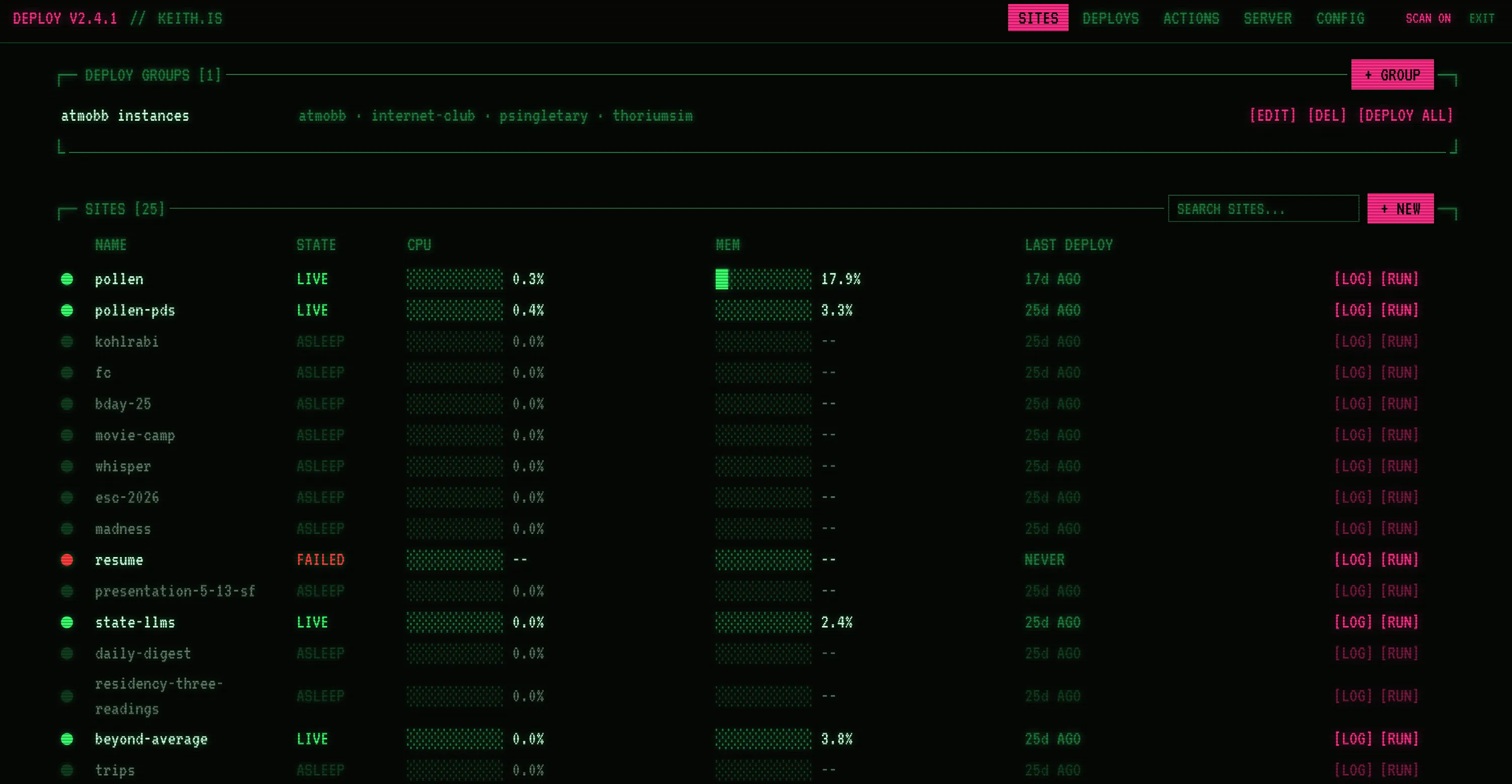
Every project on this page runs through Deploy. Right now that’s 25 sites: pollen.place and its PDS, a handful of atmoBB forums, linkring, movie camp, and a long tail of things I made for one weekend. When I get an idea for a new minisite, the gap between “I want to build this” and “it’s live on the internet” is basically just the time it takes to write the code.
From a Git URL to a live site
A deploy is seven steps, and each one gets timed and recorded so the dashboard can draw it as a waterfall while it runs:
- Clone the repo (with a GitHub token for private ones).
- Overlay any “build sources”, which are extra files copied in from a private repo or a path on the server. Handy for config I don’t want in a public repo.
- Build with Railpack, Railway’s open source successor to Heroku buildpacks. It looks for
package.json,Gemfile,requirements.txt,Cargo.tomland friends and figures out the rest. - Start the new container. If an old one is already running, the new one comes up next to it on a fresh port and the old one keeps serving traffic.
- Health check by hitting the new container every second for up to two minutes.
- Switch traffic over, stop the old container, rename the new one.
- Register actions the site defines (more on those below).
If the health check fails, Deploy dumps the last 50 lines of the container’s logs into the build log and rolls back to the old container. Pushing something broken doesn’t take the site down, which matters because I push something broken pretty regularly.
Builds run under nice and ionice with BuildKit capped at two parallel jobs, so building one site doesn’t make every other site on the box slow. Env vars go into the build as BuildKit secrets instead of getting baked into image layers, and every container gets 512MB of memory and one CPU.
Push to main and a GitHub webhook (HMAC verified) kicks the whole thing off again.
Sleeping and waking
Most of my sites get visited in bursts, then nobody looks at them for weeks. Glitch handled this by putting projects to sleep, and so does Deploy.
A monitor checks every minute for sites that haven’t had a request in a while (30 minutes by default, configurable per site to 5, 30, or 60). Sleeping sites have their container stopped outright, so they cost zero CPU and zero memory. The next request to a sleeping site starts the container back up, and the visitor gets a waiting page in the meantime.
On the dashboard screenshot above, about half the sites are ASLEEP. That’s why one medium-sized server can hold all of them.
The black hole
The waiting page used to say “Site Building” in plain text, which was boring. Now it’s a black hole.
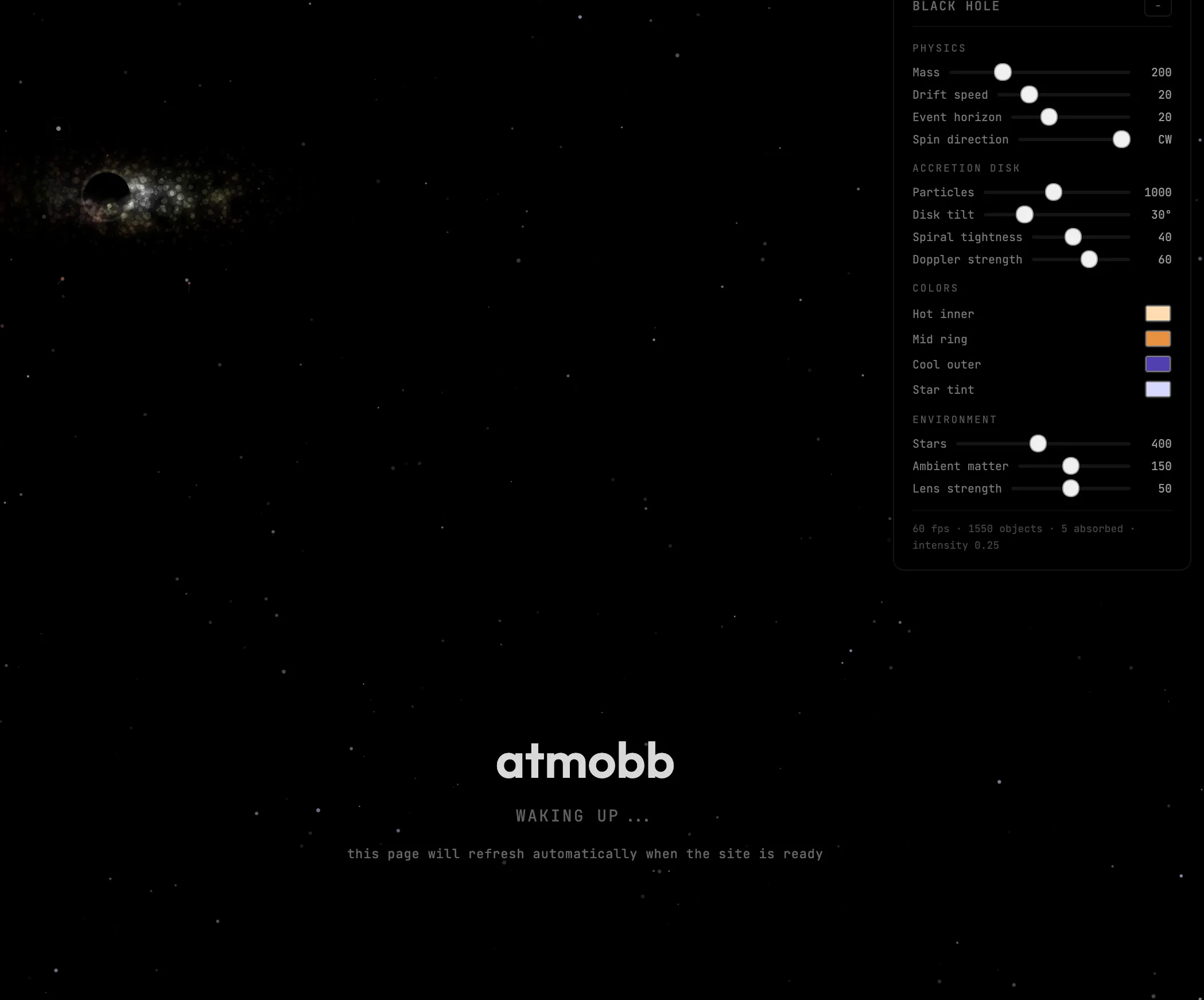
Whenever a site is building or waking up, its own subdomain serves a full-screen canvas simulation, no libraries. There are 400 background stars that bend away from the hole (a cheap fake of gravitational lensing), a 1,000-particle accretion disk with spiral arms colored by temperature from cool purple through orange to hot white, and Doppler beaming so the side of the disk spinning toward you glows brighter. Particles behind the disk draw behind the event horizon and the ones in front draw in front, so it reads as 3D even though it’s all 2D.
Loose matter drifts in under inverse-square gravity and leaves streaks. When something gets absorbed, the photon ring pulses. The hole follows your mouse or finger, and when you leave it alone it wanders around in a Lissajous curve.
There’s also a panel of sliders for mass, disk tilt, spiral tightness, Doppler strength, lens strength, spin direction, and all the colors, because if you’re going to make somebody wait you might as well give them a toy. The page polls every two seconds and reloads itself when the site is up.
How it’s built
It’s a Bun and TypeScript monorepo with six packages: core (types and the database), server (API, proxy, and the deploy pipeline), cli (setup and admin), admin (the dashboard), actions (scheduled tasks and webhooks), and mcp (more on that below). About 39,000 lines, 6,000 of them tests.
Bun does a lot of heavy lifting. bun:sqlite for the database, Bun’s $ shell for talking to Docker, Bun.password for hashing, built-in WebSocket upgrades, and Bun’s built-in Postgres client, so adding per-site databases didn’t add a dependency. The server’s runtime dependencies are croner and yaml. That’s it.
State lives in SQLite: sites, deploys, logs, metrics, sessions. The catch is that Deploy needs a real persistent filesystem, so it won’t run on Fly or Heroku. It wants a VPS, which is fine, because it’s supposed to be the thing running on the VPS.
Routing is two layers. Caddy sits out front handling TLS (Let’s Encrypt, HTTP/3, a wildcard certificate for every subdomain) and sends everything to the Bun server, which looks up the site by hostname and proxies to the right container on localhost. Containers only bind to 127.0.0.1, so nothing is reachable except through Deploy. Custom domains, including wildcards like *.pollen.place for apps that hand out subdomains to their users, get validated through Caddy’s on-demand TLS, so adding a domain never needs a Caddy reload.
Sites that need to keep files get a persistent /data volume that survives redeploys. Most of my little apps just drop a SQLite database in there. The ones that need more can attach their own Postgres database, and Deploy creates the role and database and injects DATABASE_URL. There’s also a Docker Compose mode for things that need more than one container.
The dashboard
The admin UI is all web components. Sixteen custom elements, no framework, built with bun build. It’s plain, and it’s fast.
It’s also where I’ve had the most fun. The design direction is “terminal-meets-toy”: hard borders, zero border radius, dense monospace lists, and then hot pink and moss green on top so it doesn’t feel like a cloud control panel. The type is Monaspace Argon for body text and Departure Mono for display, which is where the Glitch-era nostalgia lives. Its latest outfit is a CRT hosting console, with a scanline toggle and a status ticker along the bottom showing live sites, today’s deploys, and server load.
Live CPU and memory for every container get sampled from docker stats every five seconds, kept for a week, and drawn as hand-rolled SVG charts. No Prometheus, no Grafana. There are also share links for giving someone temporary access to a private site, and deploy groups for rolling one build out to several sites at once (that’s how all the atmoBB forums update together).
Actions
Sites can define actions in a .deploy/actions folder: cron jobs, webhook handlers, lifecycle hooks. Deploy discovers them after every deploy and runs them for you.
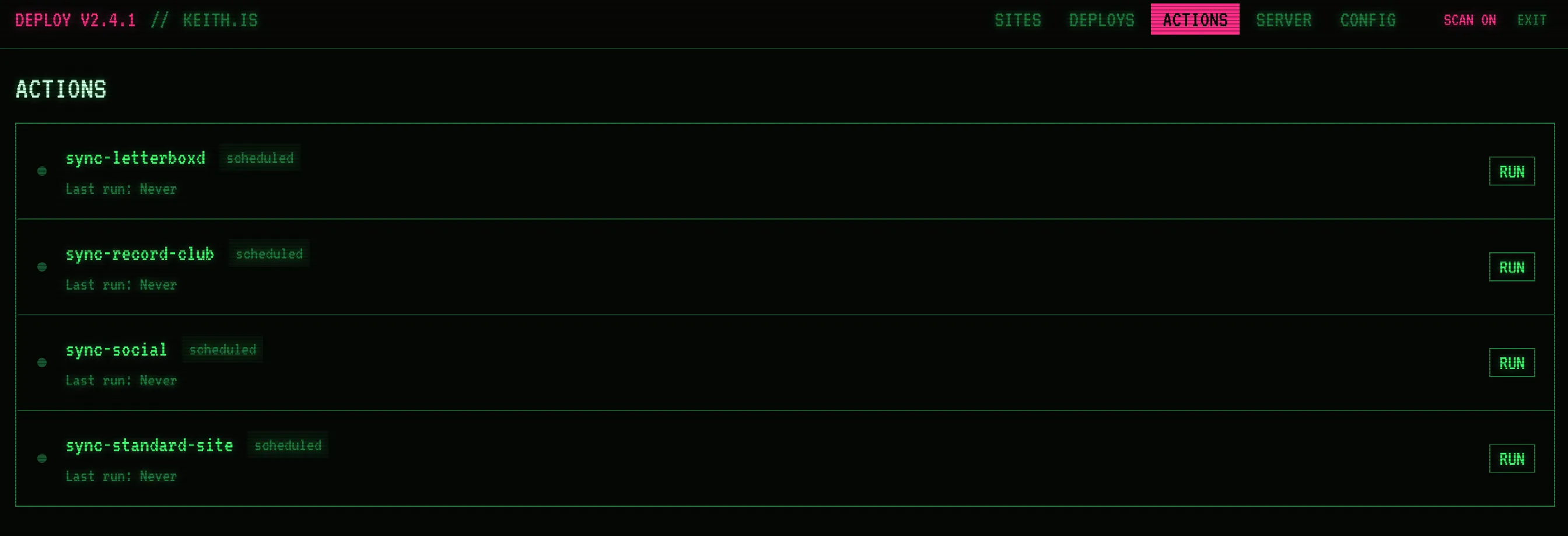
This blog uses them to pull in my Letterboxd and Record Club activity, sync posts out to standard.site, and refresh the social footers on posts. Actions can also redeploy their own site, so the blog can rebuild itself when there’s something new to show.
Talking to it from Claude
Deploy ships with an MCP server, a 312KB Bun executable that wraps the API. It has tools for creating sites, redeploying, reading logs, managing env vars and build sources, setting custom domains, and attaching databases. In practice this means I can say “redeploy the blog” or “add atmobb.app as a custom domain on atmobb” in the middle of working on something else and never open the dashboard.
How it got here
The first commit was in May 2025, and it looked nothing like this. It started as a Bun CLI that pointed Caddy at folders of static sites on disk. In August 2025 (commit message: “i dont have a job rn”) it got Docker support, and then I spent a couple of weeks trying to turn it into a full Glitch replacement for me and my friends, with a code editor in the browser and a self-hosted Git server. It worked! It was also way too much.
In September 2026 I moved everything off DigitalOcean onto one UpCloud machine. Standing the sites back up was the easy part because every one of them was already a Git URL Deploy knew how to build.
Using it
The code is on GitHub, and there’s a one-line install script for a fresh Ubuntu server that sets up Bun, Docker, Caddy, and Railpack. Point an A record and a wildcard A record at the box and you’re most of the way there.
It’s built very specifically for how I work, and I’m not promising to fix your edge case. Not suitable for a platform business, but perfect for one person who keeps building things. Fork it and make it yours.